Monday, July 20, 2009

Backup Your Outlook! using "Personal Folders Backup" a FREE Addin from Microsoft

Backup Outlook PST Files Regularly with Personal Folders Backup

DOWNLOAD MS Install, pfback.exe HERE

The Personal Folders file (.pst) of Microsoft Outlook is one of the most important files on your computer that stores offline copies of all your email messages, calendar appointments, contacts, tasks and other Outlook items. [PST = Personal Storage Table]

outlook pst backup tool

Whether you download emails from Gmail Inbox to Outlook or sync Google Calendar with Outlook Calendar, everything gets saved in a PST file on your hard drive. It is therefore extremely important that you regularly backup your Outlook PST files so as not to lose any data in the event of a computer crash.

Though you can create a backup copy of your Outlook .pst files using the Import and Export wizard in Outlook, that’s slightly cumbersome and puts some pressure on your memory since it’s for you to remember the date when you have run the same backup process again.

personal-folders-backup

To save you from this backup stress, Microsoft has a free Outlook add-in called Personal Folders Backup that works with all versions of Outlook and weighs just 160 kb.

This tool can backup all your PST files in a single click and will automatically remind you to perform a backup after ‘x’ number of days. The same tools can also be used to restore Outlook data from previous backups.

The Personal Folders Backup tool has been available since long but the new version that’s released today includes support for Outlook 2007.

DOWNLOAD MS Install, pfback.exe HERE

ADDITIONAL INFO FROM MicroSoft: HERE

article copied from: http://www.labnol.org/software/tutorials/backup-outlook-pst-personal-folders-files-regularly/3214/

Thursday, July 16, 2009

Saturday, July 11, 2009

My NEW Reality TV Show just picked up!

THE SHOW TITLE: So you think you can fish with 2 gay singers and an over weight, former model, American millionaire, single mother of 8 on a dangerous Alaskan island while getting a makeover from bikers in a remodeled restaurant full of military cops, criminals and zany inventors? THE HOSTS: To determine who will host and co-host the show, a tag-team Tri-athalon match between Hulk Hogan/Howie Mandel and Jesse Ventura/Ryan Seacrest will take place on the first exciting episode. The potential hosts will compete in wrestling, cooking, and child rearing. THE JUDGES: There will be at least one pompous English judge, a drunken former "questionable" star as well as several unknown bad song writers and some guy that eats live fish he catches with his bear hands (Yes! surgically installed Bear Paws as hands!). THE THEME SONG: So far, any song that sounds like that one Fray song that sounds like every other Fray song is being considered for the theme song. NOTES: Planning and Casting will begin soon. Any other suggestions?

Wednesday, July 8, 2009

Exchange or Transfer Large Files

Hey guys, To FTP or Not to FTP? Not sure if you are familiar with "yousendit" or other online web apps that let you send large files, but i stumbled upon a nice looking site that may turn out to be pretty cool. I Just started using it myself..but it's worth a look. http://www.transferbigfiles.com/ is a great, easy and FREE website that you can use to send any files too large for email. You can also tell someone to go there if they need to get files to you. It's a snap! Best of all, No registration required. No nags. No spam etc. here is a review i looked up. http://creativebits.org/review/heavy-weight_file_emailing_solutions_reviewed
view original post:

Tuesday, June 9, 2009

Toxic Flip Flops!

No, not the name of a cool new punk/beach band. In case you haven't heard about this yet, I got an email from Eric Quinlan warning about purchasing toxic flip flops at Walmart. An article explaining how Walmart said only 10 people out of millions complained is refuted by some customer website which show some very disturbing chemical burns on a growing list of people. A few links to research the issue below: http://www.snopes.com/medical/toxins/flipflop.asp http://www.lamanaphotography.com/walmart.htm

Thursday, May 21, 2009

Autocad wont snap to hatch lines

It always happens at the wrong time... suddenly AutoCad decides to mysteriously change settings while you are working. I ran into this today and forgot the command to remedy.
it is:
osnaphatch
input 1 to be able to snatch to hatch objects and lines.
view original post:
Blogger: Maxhouserocks

Thursday, May 14, 2009

Make ‘Folders View’ the Windows Explorer Default in Windows XP

Finally found this trick to ALWAYS have folders open in "Folders View". 
Thanks a million to "Dale Dietrich" on www.daleisphere.com
http://www.daleisphere.com/make-folders-view-the-windows-explorer-default-in-windows-xp/

Make ‘Folders View’ the Windows Explorer Default in Windows XP

Categories: small officeutilitieswindows xp Tags:

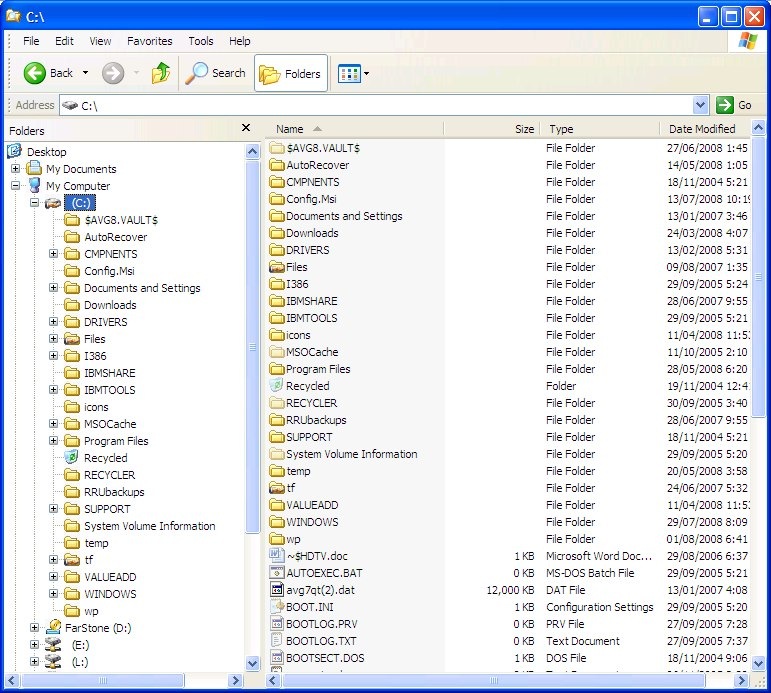
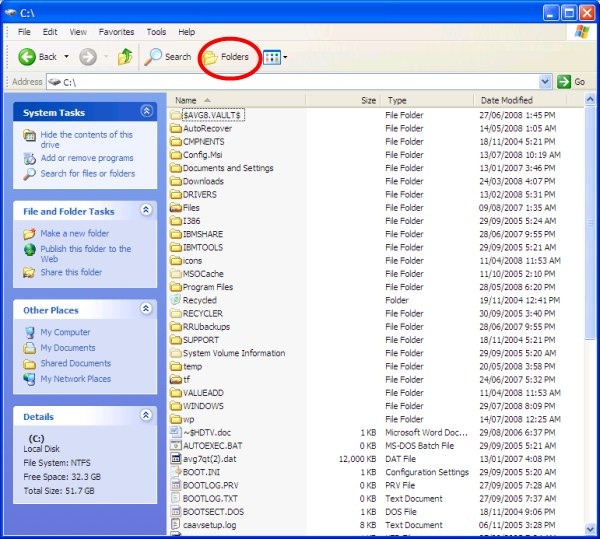
Windows XP Windows Explorer Folders View   Windows XP Windows Explorer Default View (click images for larger views)

From the launch of Windows XP in October of 2001 until two days ago I have been frustrated by the fact that, unlike every version of Windows, Windows Explorer could not be set to open in ‘folders view’ (pictured on the left above) by default. Instead the default view has been the wholly useless and very frustrating ‘common tasks view’ pictured on the right above. Fortunately Windows Explorer in Vista doesn’t saddle the user with the same issue.

I must have clicked on the “Folders” button (circled in red in the right picture above) many thousands of times over the last 7.5 years to get Windows Explorer to show me the directory tree in ‘folders view’ (the left pain in the left picture above). I had searched for a solution to this at least a dozen times in the intervening years. I finally found an easy solution.

The Solution

With Windows Explorer open in the toolbar:

  • left click ‘Tools’
  • left click ‘Folder Options…’

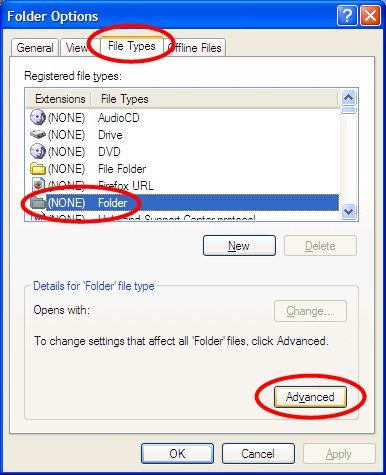
to open the ‘Folders Options’ windows depicted below.

Windows XP Folder Options Window

In the ‘Folders Options’ window:

  • left click on the ‘File Types’ tab
  • left click on the ‘(NONE) Folder’ file type
  • left click on the ‘Advanced’ button

all as pictured above, to open the ‘Edit File Type’ window depicted below.

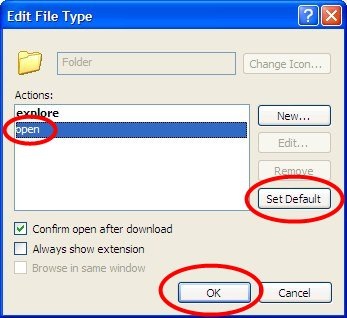
Windows XP Edit Folder File Type 

In the ‘Edit File Type’ window:

  • left click the ‘open’ action to select it
  • left click the ‘Set Default’ button
  • left click the ‘OK’ button

Voila! From now on, Windows Explorer will open in ‘Folder View’.

[Update: As others have pointed out in the comments below, selecting "explore" rather than "open" solves the problem for them.  One or the other should work.]

Blogger: Maxhouserocks http://maxhouserocks.blogspot.com/2009/05/make-folders-view-windows-explorer.html