Thursday, January 7, 2010

Google Wave - The wave of the Future?


Heard of it yet?
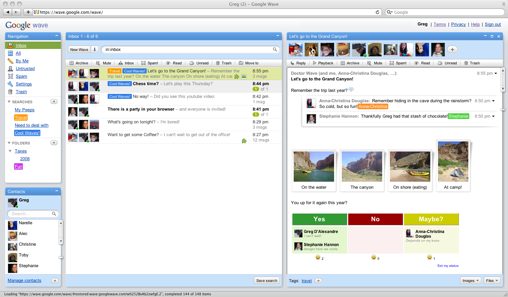
Google Wave is an online tool for real-time communication and collaboration. A wave can be both a conversation
and a document where people can discuss and work together using richly formatted text, photos, videos, maps, and more.

At this point, it may take a while to get an invitation to use this early version of Wave. The links below are some articles for more info. as well as the official google page where you can ask for an INVITATION to be a user.


Thursday, December 17, 2009

Zoom IN / OUT in a Web Browser.

Just in case you didn't already know, when using almost any web browser these days you can zoom in or out to view the web page larger or smaller. Try it in Explorer, FireFox, Chrome, Opera, etc.

Using the Mouse:
If you have a mouse with a wheel hold down the CTRL key, and then scroll the wheel to zoom in or out.

Using the Keyboard:

From the keyboard you can increase or decrease the zoom value in 10% increments.
To zoom in, press:  CTRL+PLUS SIGN (+).
To zoom out, press:  CTRL+MINUS SIGN (-).
To restore to 100%, press:  CTRL+0.

Tuesday, October 27, 2009

Google Voice Liberates Voicemail

Users of Google Voice can now choose Google as a voicemail provider for existing mobile numbers, displacing mobile carrier voicemail systems in the process.

Google (NSDQ: GOOG) on Tuesday plans to enable a subset of Google Voice features, notably voicemail, when using an existing mobile number, a move that partially thwarts Apple's effort to keep Google Voice off the iPhone.

Google Voice provides a variety of calling services in conjunction with a new Google Voice number. The service is designed to receive calls to the user's Google Voice number and then ring all of the existing phone numbers supplied by the user to connect the incoming call.

ARTICLE: http://blogs.computerworld.com/14984/google_voice_now_works_for_call_forwarding maxhouserocks blog: www.blogger.com - autofeed to FaceBook http://maxhouserocks.blogspot.com/2009/10/google-voice-liberates-voicemail.html

Tuesday, September 1, 2009

Snap to Both Sides of Walls in AutoCAD Architecture – Layer 0

Just in case you forget every once in a while...

AutoCAD Architecture walls have a justification line and a width. Sometimes snaps will only work on the justification line and not on the linework determined by the width setting. After some aggravation with this, I've found the cause and the solution.

ACA will not snap to both sides of a wall if layer "0" is turned off. Be sure to keep both "0" and "defpoints" turned on in model space and in all paper space viewports.

As a general rule neither of those layers should actually be used to show linework in a drawing because they have so many behind the scenes uses. Layer "0" is used so heavily in blocks that you really want to always have it on. The reason that I ran accross this dilemna this week was drawing an addition onto CAD drawings produced by someone else.  They had made heavy use of layer "0" for linework and hatch.

Wednesday, August 5, 2009

I think I'm turning MAC'anese, if you please

Today is a new and glorious day! Oh glorious day! I just got an iPhone (3gs, 16mb)  last night and i feel soooo relieved to get out of Windows mobile 6 HELL!!
As a matter of fact, Dawnmarie and i both FINALLY got into our new iPhones and will soon be making the swith to MAC laptops... me thinks!
No problem for DM. She'll be at ease being back in the MAC world as a teacher... Windows was not friendly or helpful for her. Me though,  with my 3d and Autocad apps i am a bit worried about taking the plunge, but ive read many articles and forums lately where people discuss running AutoCad and 3ds Max using dual boot and bootcamp for windows apps.
Also, considering dumping Outlook right now, moving to Gmail and Google Calendar. We also use a great online shared calendar system called Airset that will work well with google and the iPhone.
So, any general comments, recommendations, etc. about the whole switch to MAC thing?

Monday, July 20, 2009

Backup Your Outlook! using "Personal Folders Backup" a FREE Addin from Microsoft

Backup Outlook PST Files Regularly with Personal Folders Backup

DOWNLOAD MS Install, pfback.exe HERE

The Personal Folders file (.pst) of Microsoft Outlook is one of the most important files on your computer that stores offline copies of all your email messages, calendar appointments, contacts, tasks and other Outlook items. [PST = Personal Storage Table]

outlook pst backup tool

Whether you download emails from Gmail Inbox to Outlook or sync Google Calendar with Outlook Calendar, everything gets saved in a PST file on your hard drive. It is therefore extremely important that you regularly backup your Outlook PST files so as not to lose any data in the event of a computer crash.

Though you can create a backup copy of your Outlook .pst files using the Import and Export wizard in Outlook, that’s slightly cumbersome and puts some pressure on your memory since it’s for you to remember the date when you have run the same backup process again.

personal-folders-backup

To save you from this backup stress, Microsoft has a free Outlook add-in called Personal Folders Backup that works with all versions of Outlook and weighs just 160 kb.

This tool can backup all your PST files in a single click and will automatically remind you to perform a backup after ‘x’ number of days. The same tools can also be used to restore Outlook data from previous backups.

The Personal Folders Backup tool has been available since long but the new version that’s released today includes support for Outlook 2007.

DOWNLOAD MS Install, pfback.exe HERE

ADDITIONAL INFO FROM MicroSoft: HERE

article copied from: http://www.labnol.org/software/tutorials/backup-outlook-pst-personal-folders-files-regularly/3214/