Tuesday, June 9, 2009

Toxic Flip Flops!

No, not the name of a cool new punk/beach band. In case you haven't heard about this yet, I got an email from Eric Quinlan warning about purchasing toxic flip flops at Walmart. An article explaining how Walmart said only 10 people out of millions complained is refuted by some customer website which show some very disturbing chemical burns on a growing list of people. A few links to research the issue below: http://www.snopes.com/medical/toxins/flipflop.asp http://www.lamanaphotography.com/walmart.htm

Thursday, May 21, 2009

Autocad wont snap to hatch lines

It always happens at the wrong time... suddenly AutoCad decides to mysteriously change settings while you are working. I ran into this today and forgot the command to remedy.
it is:
osnaphatch
input 1 to be able to snatch to hatch objects and lines.
view original post:
Blogger: Maxhouserocks

Thursday, May 14, 2009

Make ‘Folders View’ the Windows Explorer Default in Windows XP

Finally found this trick to ALWAYS have folders open in "Folders View". 
Thanks a million to "Dale Dietrich" on www.daleisphere.com
http://www.daleisphere.com/make-folders-view-the-windows-explorer-default-in-windows-xp/

Make ‘Folders View’ the Windows Explorer Default in Windows XP

Categories: small office • utilities • windows xp Tags: • • •

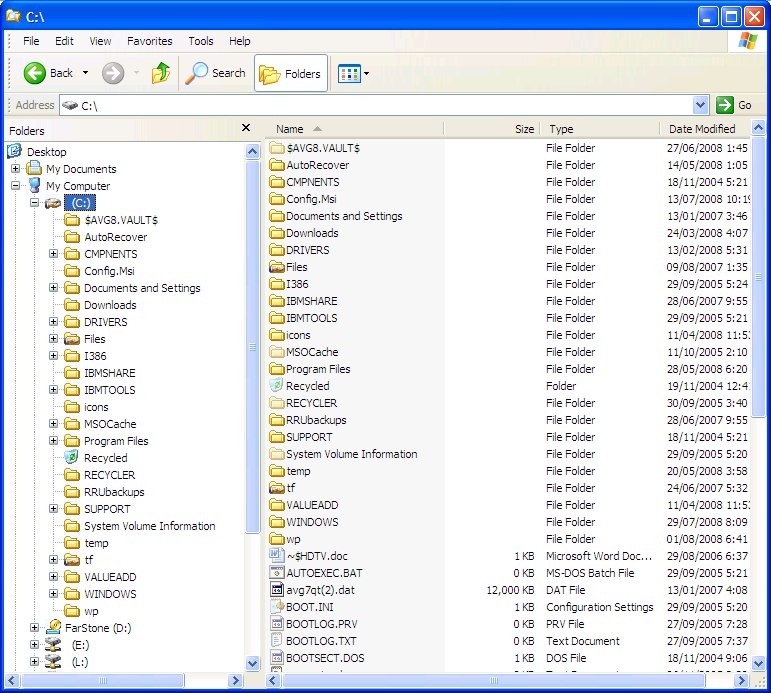
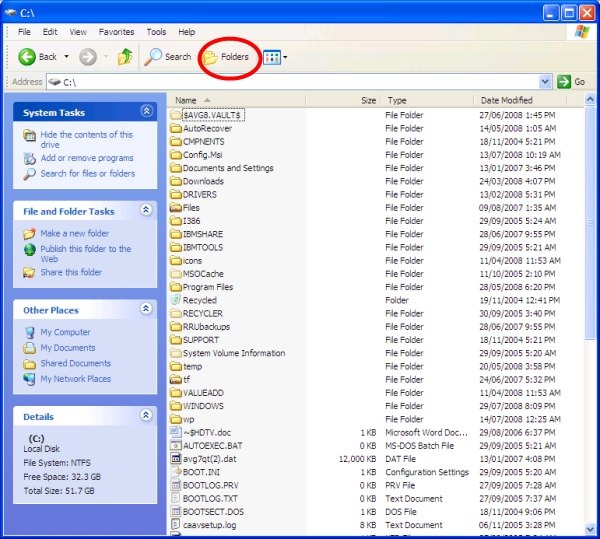
Windows XP Windows Explorer Folders View   Windows XP Windows Explorer Default View (click images for larger views)

From the launch of Windows XP in October of 2001 until two days ago I have been frustrated by the fact that, unlike every version of Windows, Windows Explorer could not be set to open in ‘folders view’ (pictured on the left above) by default. Instead the default view has been the wholly useless and very frustrating ‘common tasks view’ pictured on the right above. Fortunately Windows Explorer in Vista doesn’t saddle the user with the same issue.

I must have clicked on the “Folders” button (circled in red in the right picture above) many thousands of times over the last 7.5 years to get Windows Explorer to show me the directory tree in ‘folders view’ (the left pain in the left picture above). I had searched for a solution to this at least a dozen times in the intervening years. I finally found an easy solution.

The Solution

With Windows Explorer open in the toolbar:

  • left click ‘Tools’
  • left click ‘Folder Options…’

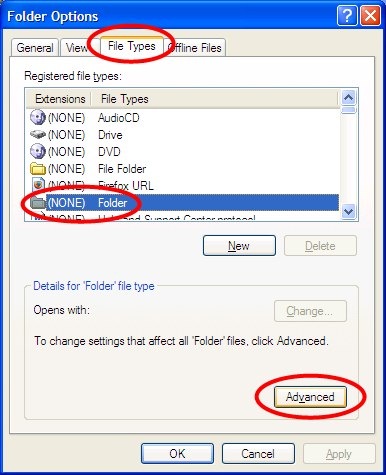
to open the ‘Folders Options’ windows depicted below.

Windows XP Folder Options Window

In the ‘Folders Options’ window:

  • left click on the ‘File Types’ tab
  • left click on the ‘(NONE) Folder’ file type
  • left click on the ‘Advanced’ button

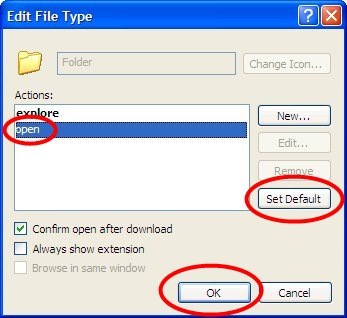
all as pictured above, to open the ‘Edit File Type’ window depicted below.

Windows XP Edit Folder File Type 

In the ‘Edit File Type’ window:

  • left click the ‘open’ action to select it
  • left click the ‘Set Default’ button
  • left click the ‘OK’ button

Voila! From now on, Windows Explorer will open in ‘Folder View’.

[Update: As others have pointed out in the comments below, selecting "explore" rather than "open" solves the problem for them.  One or the other should work.]

Blogger: Maxhouserocks http://maxhouserocks.blogspot.com/2009/05/make-folders-view-windows-explorer.html

Thursday, March 19, 2009

New Website for Dennis Astorino, Pittsburgh

Hey guys, i have been working with Dennis Astorino, formerly of Astorino in Pittsburgh, on a new website. http://www.dlastorino.com Dennis Astorino and the Astorino family business has been well established in Pittsburgh for a long time now in the Architectural field. Dennis was with the firm, Astorino, for many years but has recently split off to start his own company, DL Astorino Architects, Pittsburgh, Pa. Check out the site and let me know what you think.

Sunday, June 22, 2008

Ybor City, Tampa

The Hulkster is runnin wild in Tampa!

I think he still lives here and our friends have seen him out in Ybor City several times before...so we headed down for a night on the town.

We saw him at Gaspars Grotto in Ybor City on friday night. He was totally cool and hung out at the bar until it started to get crowded.

We hung out for a while after Hulk left, then went the Green Iguana for a few. Good times!


Thursday, February 14, 2008

Outlook duplicate Remover

This is totally free and very reliable app. I recommend it to all to help keep outlook under control. It will find duplicates from any folder or archive folder and create a new sub-folder with the duplicates moved there for review before removing. http://www.vaita.com/ODIR.asp Feel free to ask me any questions before using. Ive had alot of experience with corrupt outlook files lately. IMPORTANT: As a general rule, i also recommend creating an Outlook BACKUP manually by opening outlook, File Menu, Data Management, and hit "open folder" to view your actual outlook file location. A windows file explorer will open. It is in a .pst file format. Next, close outlook but keep that windows file explorer open, select your .pst file and select copy from Edit Pulldown Menu, then paste into same directory. it will save a copy there that you can go back to before making any changes to outlook and just to back up weekly or so. Bob

Monday, June 25, 2007

Back in Pensacola

http://www.visitpensacola.com/images/db/static/About/beach3.jpg
Well, we're back in Pensacola, Florida for a bit before heading back to the 'Burgh. This is a great place also and we have enjoyed visiting MANY cool places on Pensacola Beach and Casino Beach (Peg Leg Pete's, The Boardwalk, Paradise Inn, Bamboo Willies, Flounders) All stretched along some beautiful, clean and exciting beach areas. We're off for one more day on the beach, some last day seafood and maybe a few drinks :)